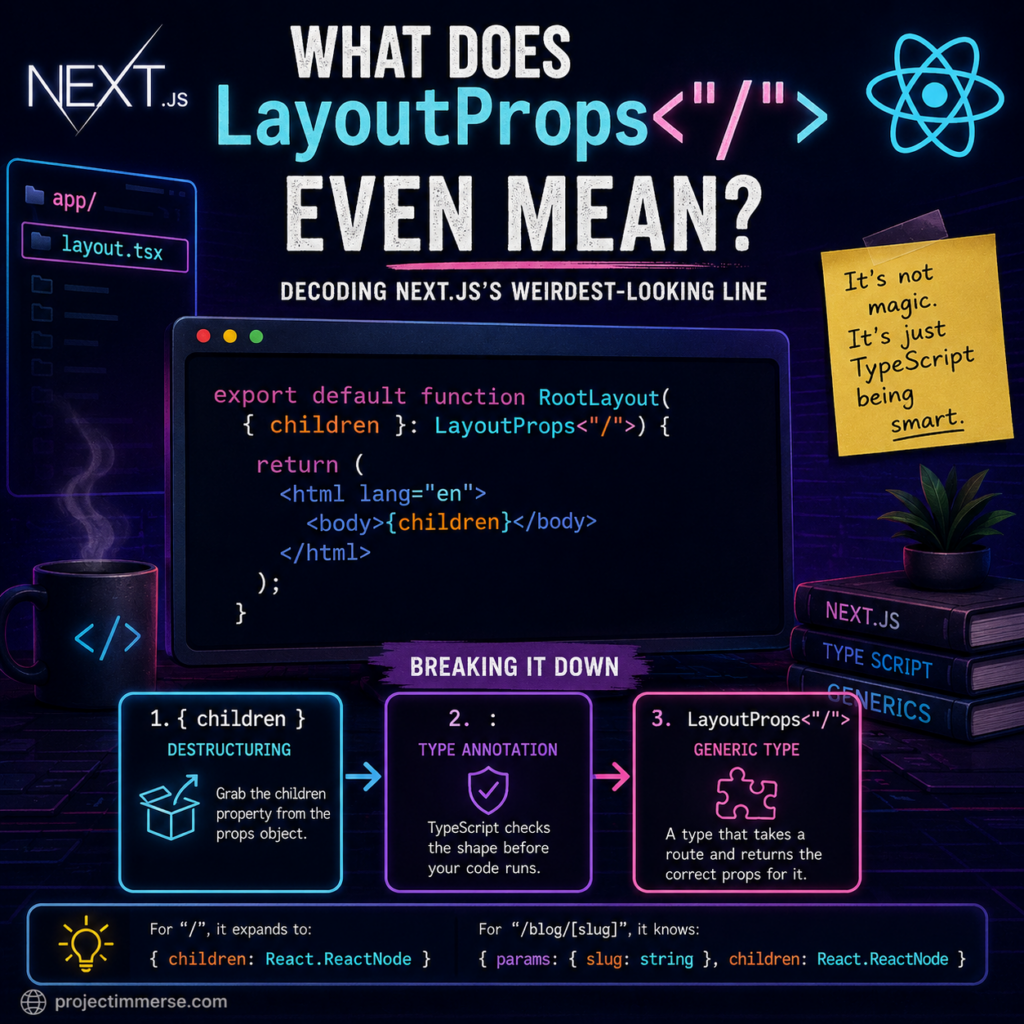
LayoutProps<"/"> mean in Next.js? The syntax combines JavaScript destructuring, a TypeScript type annotation, and a route-aware generic type.If you’ve recently created a Next.js app with the App Router and opened up app/layout.tsx, you’ve probably run into this line and quietly questioned your life choices:
export default function RootLayout({ children }: LayoutProps<"/">) {
It looks like someone fell asleep on their keyboard mid-generic. But don’t worry — nothing is broken, you didn’t mess up your install, and you don’t need to go back to plain HTML and pretend React never happened. Let’s take this line apart, piece by piece, until it stops looking like alien code and starts looking like a sentence.
The Line That Started It All
Here’s the full context, trimmed down:
export default function RootLayout({ children }: LayoutProps<"/">) {
  return (
    <html lang="en">
      <body>{children}</body>
    </html>
  );
}
There are really three separate ideas mashed together in that function signature. Once you see them as three separate things instead of one scary blob, it clicks.
1. The Curly Braces on the Left: Destructuring
function RootLayout({ children }) {
This is plain JavaScript, no TypeScript involved yet. It means: “You’re going to hand me an object. Just give me the children property from it and skip the rest.”
It’s shorthand for:
function RootLayout(props) {
  const children = props.children;
children here is just “whatever content goes inside this layout” — your actual page, your blog post, your pricing table, whatever. Nothing mystical about it.
2. The Colon: “Here’s the Type, Trust Me”
({ children }: SomeType)
The colon is TypeScript saying, “before you run this, let me double check the shape of what’s coming in.” It’s a seatbelt, not a steering wheel — it doesn’t change what your code does, it just yells at you in your editor if you mess something up before your users find out in production (which, let’s be honest, is the whole point of TypeScript’s existence).
3. LayoutProps<“/”> — A Type That Takes an Argument
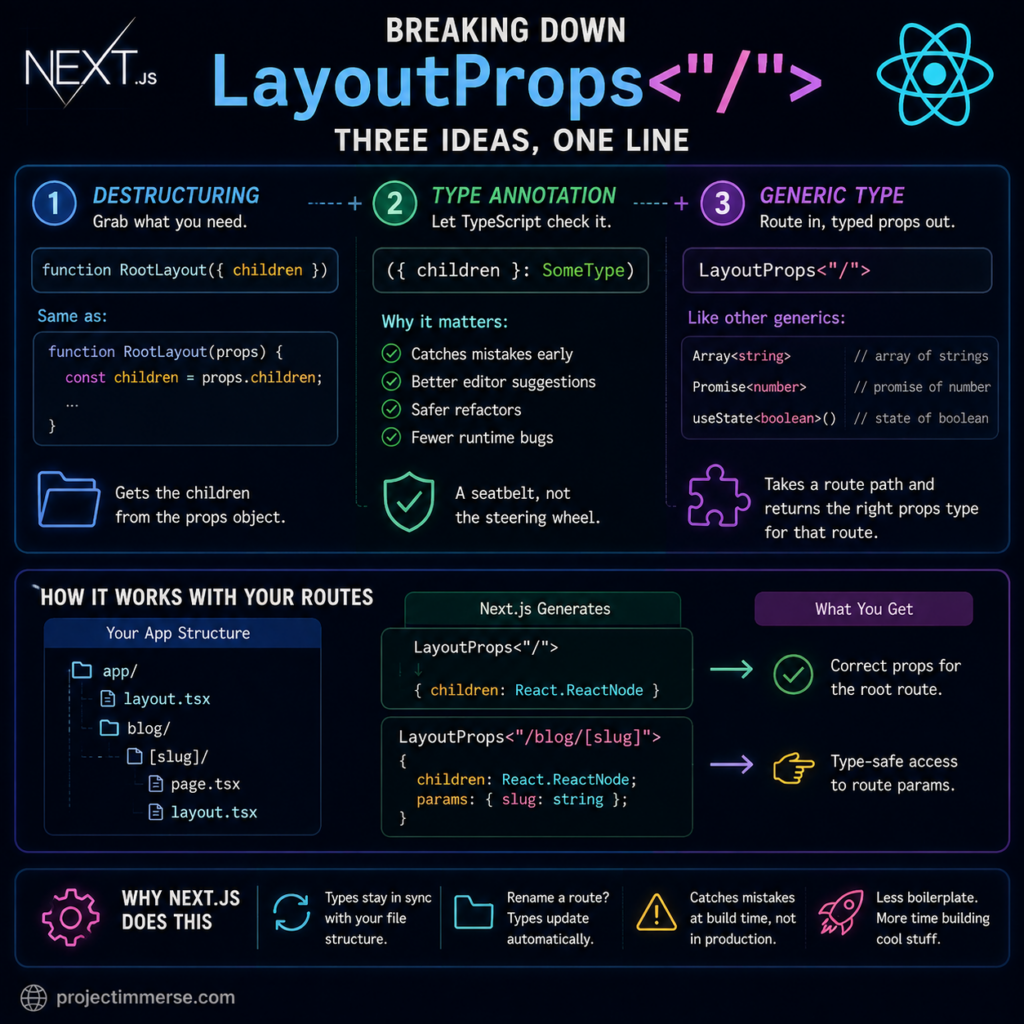
LayoutProps<"/">: Next.js combines destructuring, TypeScript type annotations, and a generic route type to generate the correct props for each layout.This is the part that actually looks unfamiliar, and it’s called a generic type. Generics are types that accept an input and spit out a more specific type, kind of like a function — except instead of taking numbers or strings, it takes other types.
You’ve probably seen this pattern before without clocking it:
Array<string>        // an array full of strings
Promise<number>      // a promise that eventually hands you a number
useState<boolean>()  // React state holding true/false
LayoutProps<"/"> follows the exact same idea. It takes a route path ("/") and generates the correct props type for that specific route. Next.js auto-generates this type for every layout in your app/ folder, based on your actual file structure — you never write it yourself, and you never import it explicitly. It’s just quietly available, like Wi-Fi you didn’t set up but are grateful for.
For your root layout at /, it expands to roughly:
{ children: React.ReactNode }
But if you had a layout for, say, app/blog/[slug]/layout.tsx, Next.js would generate LayoutProps<"/blog/[slug]">, and it would automatically know that params includes a slug string — no manual typing required, and no chance of you typo-ing slug as slgu and finding out three deploys later.
So Why Does Next.js Do This?
Before this feature existed, everyone hand-wrote layout props like this:
function RootLayout({
  children,
}: {
  children: React.ReactNode;
}) {
Which is fine for a root layout with no dynamic bits. But for nested, dynamic routes, hand-writing params types gets old fast — and worse, if you rename a folder or change a route, nothing forces your types to update. Your code silently drifts out of sync with reality, which is exactly the kind of bug that hides until 4:58pm on a Friday.
LayoutProps<"/"> fixes that by generating the type straight from your file system. Rename a route, and the type updates with it. Get it wrong, and TypeScript complains immediately instead of letting you find out from an angry Slack message.
The Plain-English Version
If you strip away the syntax entirely, that one intimidating line is really just saying:
“This function receives an object. Grab the
childrenpiece out of it. And by the way, TypeScript, please double-check that object matches whatever shape you already generated for the homepage layout.”
That’s genuinely it. Three well-established ideas — destructuring, type annotations, and generics — got compressed into a single line, which is exactly why it reads like a keyboard smash the first time you see it.
Can I Just Write It the Old Way?
Yep. For a root layout specifically, this:
export default function RootLayout({ children }: LayoutProps<"/">) {
and this:
export default function RootLayout({ children }: { children: React.ReactNode }) {
behave identically. The root route has no dynamic segments, so there’s nothing extra for the generic to buy you here. The generated LayoutProps type really starts earning its keep once you’re dealing with dynamic routes — [slug], [id], catch-alls — where hand-writing params types becomes tedious and error-prone.
The Takeaway
Next.js isn’t trying to haze you with cryptic syntax. LayoutProps<"/"> is just a generated shortcut that saves you from manually typing route params correctly every single time. Once you know it’s three familiar concepts stacked together — not one brand-new one — the App Router stops feeling like a syntax puzzle and starts feeling like, well, just TypeScript being thorough.
If a line like this trips you up again, the fix is almost always the same: split it into pieces, name each piece, and put it back together. Works for code. Works for IKEA furniture too.